

We know Apple users are passionate about their devices as much as we are passionate about offering high quality email hosting services. Our Imageway staff members have been long time fans and users of Apple based software and hardware. Since we have always appreciated the diversity Apple brings to the computer world, we wanted to provide the best email hosting services to the Apple community of users. We feel we have achieved this over the 20+ years we have been in business by consistently improving our services to support Apple based software in every way possible. The areas where we feel we offer the best email experience to Apple users are in the following areas:
Privacy
Many companies package their services as free or low cost and then take your personal information as payment. Apple has treated privacy as a fundamental human right, and made it one of their core values. Since we respect and agree with this sentiment, Imageway has always been a company that takes your privacy seriously. Since we own and manage our own hardware computer systems, none of your data is stored on or shared with any 3rd parties. Our hardware systems run in a secured data-center, and not on any of the cloud services such as Amazon AWS or Micorsoft Azure. There are no 3rd party advertisements of any sort on our services. We do not obtain or track any data except for what is required to offer our hosting services to you. We will only release data to a 3rd party as is required by law. Our computer servers are located within the local geographic area, and not spread all across the world in various jurisdictions. Lastly, by using advanced security methods, we assure your data is hardened against illegal spying attempts. We offer SSL encryption for all of our service communication protocols to ensure secure transmission from point-to-point. We also provide the ultimate email security by offering end-to-end email encryption without the use of plug-ins (works with all devices, and all email clients).
Reliability
To provide the highest level of reliability we start out by using the same rock solid operating system core that MacOS uses, UNIX. Our systems use enterprise hardware that was built with redundancy in the areas of power supply, memory, CPU, and I/O. For our data storage we use RAID 10 and ZFS for the greatest storage reliability and perform backups of this data nightly. Our hardware systems are housed in our own data centers with redundant UPS and network connectivity. Lastly, we have multiple data centers geographically separated, with all the data storage being sync’d between them. This foundation provides for a minimum of 99.99% uptime of our services. For more information about our service reliability please click here.
Speed
On top of our UNIX OS based foundation we use the most optimized software on the market for our email services to provide optimal speed. Read access to the stored data uses a combination of RAM, SSD, and HDD tiers. The filesystem RAM storage is very efficient due to using ZFS ARC caching. The ARC functions by storing the most recently used (MRU), and most frequently used (MFU) data within RAM for the quickest access possible. When the RAM cache becomes full it goes to the SSD, and then eventually to the HHD. This combination of highly optimized software and I/O access provides the highest speed possible when it comes to accessing email that is stored on our servers.
Security
All of our supported email protocols support SSL/TLS to provide encrypted communication channels between clients and servers. For example, if you send an email to Gmail, our system will create an encrypted IMAPS/POP3S connection to your email client, and then the email will be sent using SMTPS between our mail server and the Gmail server. Additionally we provide free SSL certificates to all our customer email domains we host.
For login security we support two factor authentication (2FA). This requires you to use either “Google Authenticator” or “Authy” on your iOS mobile device to generate the code required for login. Additionally, we support 2FA for IMAP, POP, and SMTP that works with any email client. If you find it a hassle to manage the 2FA code entry using the email client, you can also create application passwords which can be used for specific applications. For more information about 2FA support please click here.
Instances where you require the highest level email security, we provide end to end encrypted email support that works in any email client without the need of plugins. For more information about our end to end email encryption solution please click here.
Client Support
We have gone to great lengths to support the main methods used for communication by the included clients in MacOS and iOS (Mac Mail, iCal, and Contacts). When it comes to email synchronization support in Mac Mail for MacOS and iOS, we support IMAP(S), POP3(S), and SMTP(S). Calendar synchronization with our systems uses CalDAV(S). Lastly, contact synchronization with our systems uses CardDAV(S). Since iOS doesn’t support IMAP IDLE to provide push based email, if you require push based email then we provide ActiveSync(S) support which will also sync calendar and contact data. The “(S)” designates the availability of the encrypted version of that protocol.
If you don’t like the Mac Mail, iCal, and Contact applications included with MacOS then we can offer an alternative solution. We have partnered with the company that we feel provides the best email client for MacOS called eM Client. Our customers are entitled to receive a free 1-year subscription license of eM Client when signing up for any of our email hosting packages. Additionally, Imageway will provide direct support for eM Client Users using our email hosting services to ensure the most optimal experience possible. For more information about eM Client as an alternative email client please click here.
Lastly, we value legacy support for software and devices that use our email hosting. Just because your device is old shouldn’t mean your the services for that device have to stop working for it. We have supported email protocols that date back to 1982, and plan on supporting these methods of client communication into the future. Some companies will depreciate client communication methods that make your device obsolete on any given day. Rest assured, here at Imageway we want to make sure our services continue to work on your devices, regardless of how old they become. For more information about our legacy device support please click here.
Junk Mail (Spam) prevention
We utilize all the best spam prevention methods to provide the most spam free experience possible. This is accomplished by using SPF, SURBL, RBL, DKIM/DomainKeys, Virus Scanning, and ASpam content based message scoring mechanism. When an email is recognized as SPAM, it goes into your SPAM folder which is accessible via IMAP in your email client. If you get junk email in your INBOX, then you just move it to the SPAM folder, and this will add the email sender to your block list and train the system. If you get legitimate email in your SPAM folder, then move it to your INBOX and this will add the email sender to your friends list and train the system.
Customer Support
When you contact our support you will be in touch with a high level tech support agent that is based locally. You will not have to go through multiple levels of support to get someone with a high level of technical knowledge to get your email hosting working. We provide phone and chat support during normal business hours, and 24/7 email support. We manage our own remote access system that allows our support staff to remotely pull up your MacOS or iOS device to help us provide the best support possible by actually visually seeing and interacting with your device.
Cost
We have tried to provide the lowest prices possible for the quality of services we provide. Instead of charging on a per email account basis like most high end email hosting services, we use a shared storage concept. You can create as many email accounts as you want, and they all share the same domain storage allotment. You can limit the storage usage on a per email account basis, and you can always purchase more storage if the total allocation for the whole domain is used. Since storage is the most costly thing for us to maintain and replicate, we found this as a better basis for our pricing.
Conclusion
You can see from all the above areas, we have went above and beyond just about any other hosting company has done to provide the ultimate email hosting experience for Apple users. Our email hosting services work with your own custom domains (me@mydomain.com) and allows you to create as many email accounts you want to use the included shared storage. This goes beyond what Apple offers with their Custom Domain iCloud Mail Hosting, which is limited to five custom domains, with up to three personalized email addresses per domain. If you would like to learn more about the unique hosting features we offer, we invite you to check out the “FEATURES” header option at the top of our website to see our unique email specific features, or visit our our email hosting page.
We welcome you to become part of our family and experience our high quality email hosting services for yourself. If your new to email hosting, we can help you through the process of getting your own custom domain setup for your business or yourself. If you have an existing email solution in place and would like to move to us, we can help migrate all your existing email over to our systems without any downtime.
If you would like full information about our email hosting please click here. If you have additional questions or comments please contact us at one of the means available at: https://www.imageway.com/contact-us
 (No Ratings Yet)
 Loading...
In an era dominated by instant messaging, social media, and video conferencing, email may seem like a relic of the past. However, email remains a crucial tool for communication in both personal and professional settings. While synchronous communication channels such as phone calls and video chats are great for immediate responses, they can be distracting and time-consuming. In contrast, email is an asynchronous communication method that allows for efficient and effective communication. In this article, we’ll explore why email is still important today and why it should not be overlooked in favor of newer, trendier communication tools.
Email is an electronic asynchronous communication tool that has become one of the most widely accepted federated communication tools today. It allows users to send messages to individuals or groups in various locations worldwide. The federated nature of email allows for communication between different email services, which means that users of different email providers can still communicate with each other seamlessly. This interoperability has made email an essential tool for businesses, educational institutions, and individuals around the world. Moreover, email offers a range of features that make it a versatile tool for communication, including attachments, encryption, and archiving. Due to its ubiquity, reliability, and functionality, email has cemented its position as one of the most popular communication tools in the digital age.
Asynchronous communication is a form of communication where there is a time delay between messages. Email is one of the most popular forms of asynchronous communication, and it provides several benefits, including:
One of the main benefits of asynchronous communication is flexibility. It allows people to communicate at their own pace and on their own schedule. This is particularly important in today’s fast-paced world, where people are often juggling multiple tasks and responsibilities. With email, people can take the time to compose thoughtful and detailed messages, without the pressure of an immediate response.
Email is also great for organizing information. With email, you can easily categorize messages, create folders, and search for specific information. This makes it an ideal tool for managing complex communication threads, such as project updates or customer support requests.
Another advantage of asynchronous communication is that it reduces interruptions. Synchronous communication tools like instant messaging or phone calls can be disruptive and distracting, especially if they occur during important tasks or meetings. Email, on the other hand, allows people to check their messages at their own convenience, without disrupting their workflow.
Asynchronous communication can also increase productivity. It allows people to focus on their work without being constantly interrupted by messages and notifications. It also allows people to prioritize their tasks and respond to messages when they have the time and mental capacity to do so.
While synchronous communication channels such as phone calls and video chats have their benefits, they also have some drawbacks that email can overcome. Some of the advantages an asynchronous communication tool such as email has over synchronous communication tools include:
One of the biggest drawbacks of synchronous communication channels is that they can be incredibly distracting. Phone calls and video chats require your full attention, making it difficult to multitask or work on other projects while communicating. In contrast, email allows you to communicate without being distracted from other tasks.
Synchronous communication channels can also be incredibly time-consuming. Phone calls and video chats often require scheduling, preparation, and post-meeting follow-up. In contrast, email allows for communication to take place without any scheduling or preparation, making it an efficient use of time.
Synchronous communication channels can also be more pressure-filled than email. Phone calls and video chats require immediate responses, which can be stressful and anxiety-inducing. In contrast, email allows for more thoughtful and considered responses, as the recipient can take their time to craft a response.
Despite the rise of other communication channels, email remains a vital tool for both personal and professional communication. Here are some statistics that highlight the importance of email:
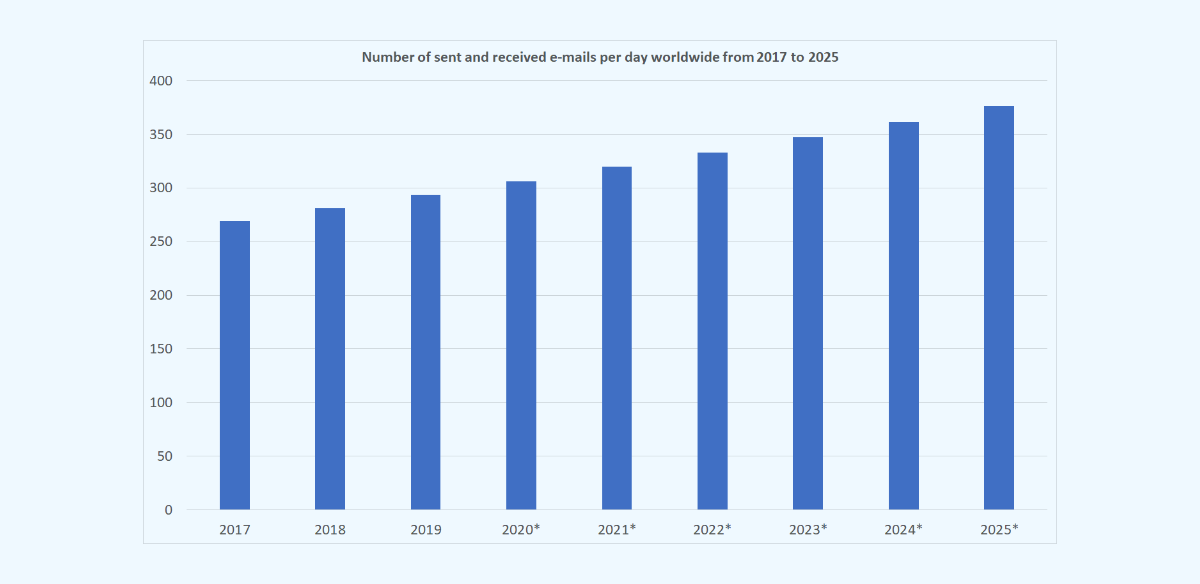
In professional settings, email is a crucial communication tool that is used for everything from customer support to project management. Email allows for efficient communication between team members, even if they are located in different time zones or countries. Additionally, email is an excellent tool for sending formal business communications, such as proposals, contracts, and invoices.
Email is a popular tool for customer support because it allows customers to communicate their issues and concerns at their own pace. This means that customers can take the time to clearly explain their problem, attach screenshots, or provide other relevant information. Customer support teams can then review the email and respond with a well-thought-out solution.
Email is also an excellent tool for project management. Project managers can use email to send project updates, assign tasks, and communicate with team members. Email allows project managers to easily keep track of communication threads and ensures that everyone on the team is on the same page.
Some of the frequently asked questions about email include:
Absolutely. While instant messaging is great for quick back-and-forth communication, email is still the best tool for more complex communication threads that require organization and record-keeping.
Email is better than phone calls and video chats because it allows for communication to take place without distractions, is an efficient use of time, and puts less pressure on the recipient to respond immediately.
Email can be secure if proper precautions are taken. This includes using strong passwords, encrypting sensitive information, and using secure email providers. Additionally, email providers have implemented various security measures to protect users from phishing attacks and other online threats.
While email has been around for decades, it continues to evolve and adapt to the changing needs of its users. In recent years, email providers have implemented new features and integrations that make email even more powerful and useful.
One of the most exciting developments in email technology is the use of artificial intelligence (AI). AI can be used to automate tasks such as email filtering, prioritization, and response drafting. This can help users save time and ensure that important messages are not overlooked.
Email is also being integrated with other tools and platforms, such as chat apps and online meeting software. This makes it easier for users to manage their workflow and ensures that important communication threads are not overlooked.
Email remains an important and efficient communication tool in the digital era. While synchronous communication channels have their benefits, email’s flexibility, organization, and record-keeping make it an invaluable tool for both personal and professional communication. As email continues to evolve and adapt, it will remain a crucial tool for communication in the years to come.
If you would like full information about our email hosting please click here. If you have additional questions or comments please contact us at one of the means available at: https://www.imageway.com/contact-us
 (1 votes, average: 3.00 out of 5)Loading...
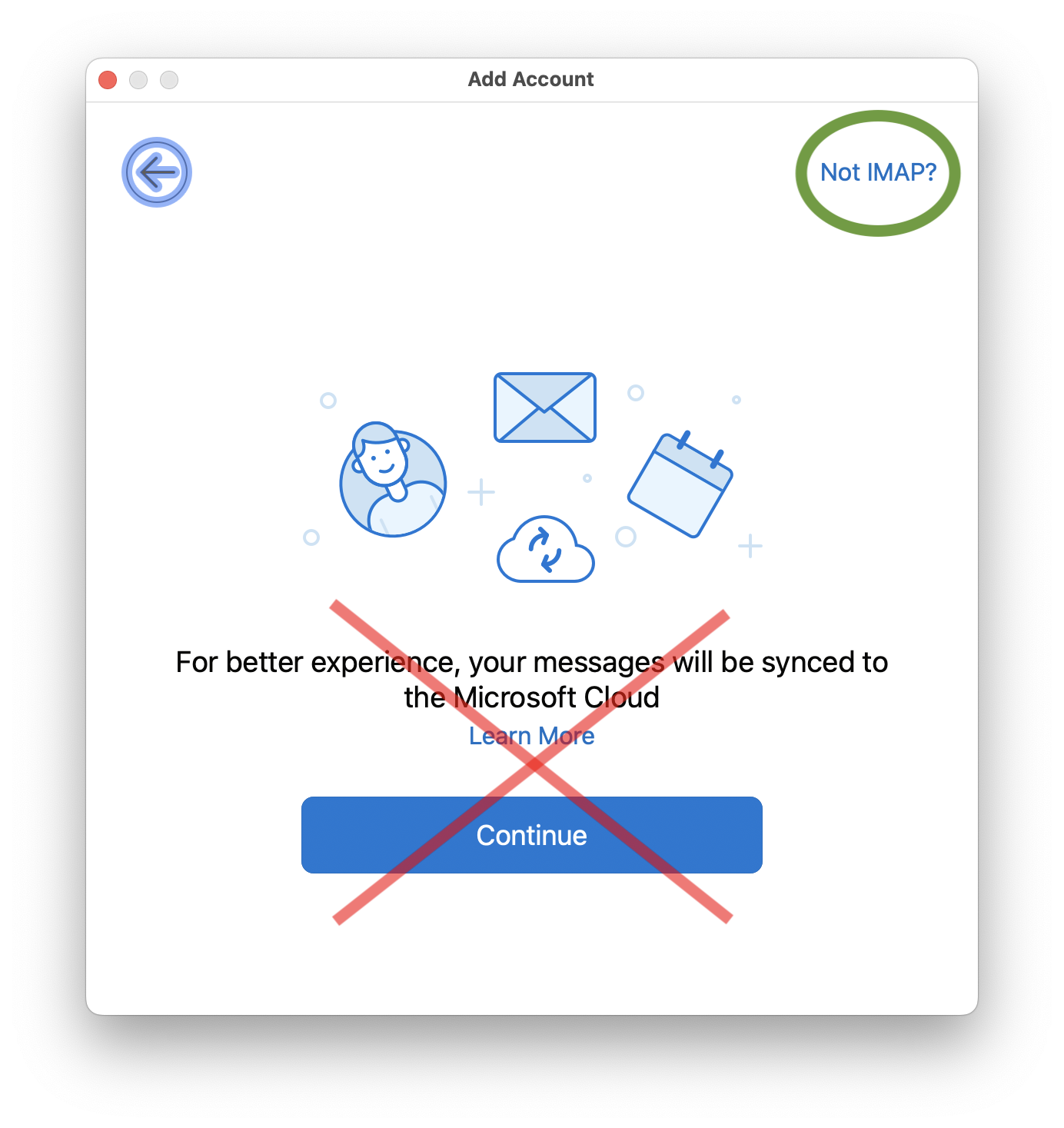
In newer versions of Outlook with the new interface enabled, Microsoft has added a new “Sync with Microsoft Cloud” feature which is enabled by default when adding a new IMAP based account to Outlook. If you enable this feature, then your account login credentials will be stored on a Microsoft Cloud server. Microsoft will then login to your IMAP account on your behalf and download all your email to Microsoft Cloud servers. We recommend you disable this feature when setting up a new IMAP account to preserve your privacy.
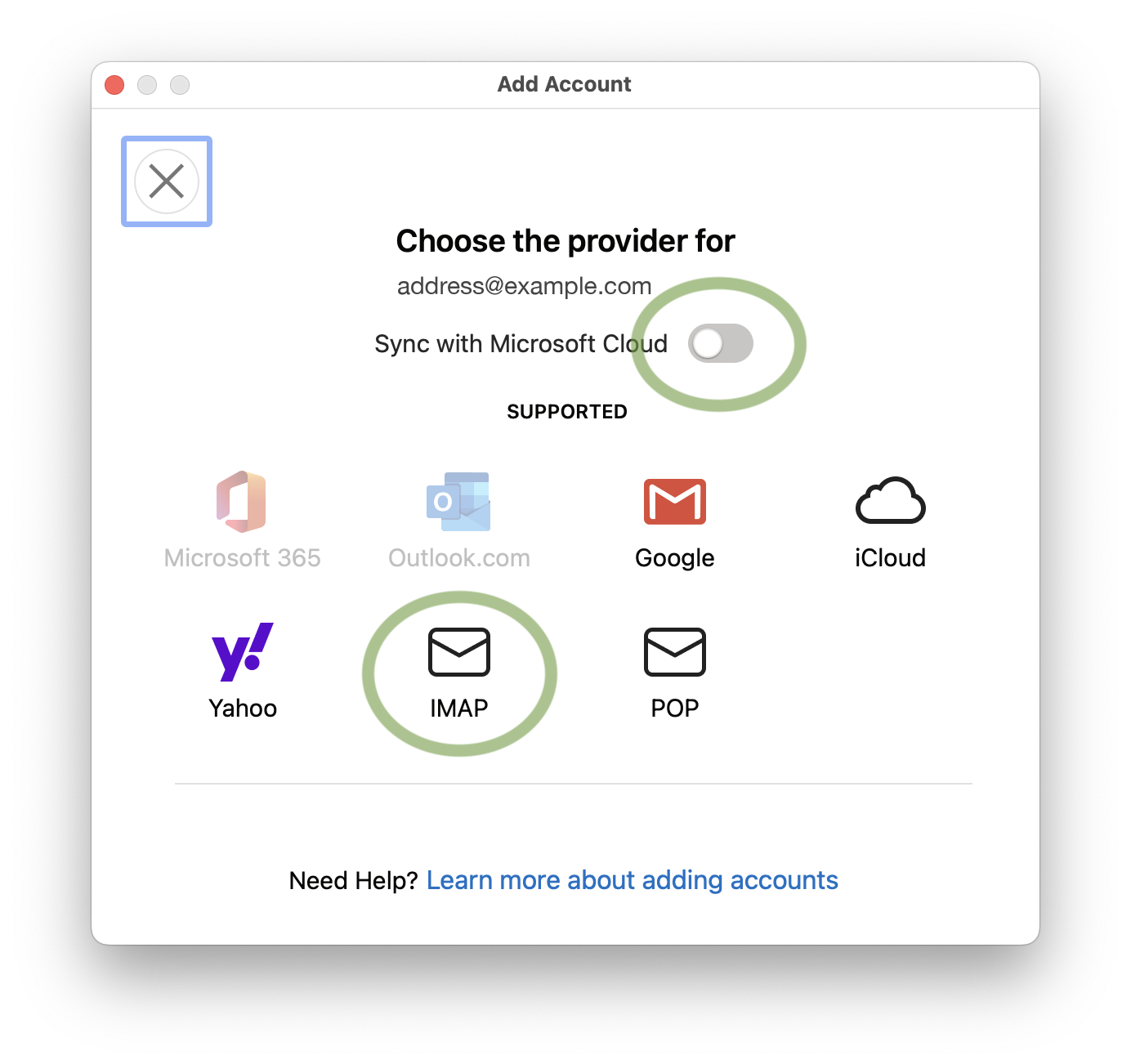
If you already setup an IMAP account which has the “Sync with Microsoft Cloud” feature enabled, then the only way to disable this feature is to remove the account and then add it back again while making sure the “Sync with Microsoft Cloud” option is disabled. Unfortunately, this option has been removed in the new Outlook for Windows and is only available in the MacOS version.
We find the way Microsoft has presented this feature in Outlook to be deceitful, and most users will unknowingly click continue which will cause their account login credentials and all of their email contents to by stored on Microsoft Cloud servers without the users full understanding. We feel that no service should download your emails unknowingly or deceitfully from your main email provider, since this increases the chances of security and privacy issues. Email communication should only be between your email client and your main email provider’s servers, in the same way web browsing should only be between your web browser and the attended web server.
If you would like to read more about the privacy implications of the new Outlook, we recommend visiting this webpage: https://www.xda-developers.com/privacy-implications-new-microsoft-outlook/
We feel now is a great time to consider alternative email clients given the fact the old Windows Mail end of life is at the end of 2024, and classic Outlook for Windows has a end of life in 2029. Once they both reach end of life you will be forced to use the new Outlook, including having to deal with this sync with Microsoft Cloud feature. If you are looking for an alternative to Outlook, we recommend eM Client. Please click here to find more information about eM Client.
If you would like full information about our email hosting please click here. If you have additional questions or comments please contact us at one of the means available at: https://www.imageway.com/contact-us
 (5 votes, average: 3.80 out of 5)Loading...
An email archive is a repository generally kept in a non-productive environment to provide secure preservation of email for compliance and operational purposes. A email archiving system automatically extracts message contents and attachments from incoming/outgoing emails and after indexing, it stores them in read-only format. This ensures that archived records are maintained in their original state.
The active approach adopted by email archiving solutions ensures that the company has a centralized and accessible copy of all its email. This provides additional protection against accidental or intentional deletion of emails by end-users. Email archiving also eliminates the need to search for personal archives on each and every local machine whenever litigation support is requested.
It must be noted that ‘backup’ and ‘archival’ storage serve two different purposes. Backups are intended to save current data against the event of failure or disaster whilst archives protect data so that it can be accessed when needed.
Email archiving is available on all our Email Hosting accounts. The email archiving feature is disabled by default. To turn it on do the following:
1) Login to the “Domain Management” section on the Email Message System for your domain.
2) Click the “Misc” button.
3) Make sure the “Disable Legal Archive” option is unchecked, and then click the “Save” button.
Once you do this, a copy of all incoming and outgoing email for your domain will be kept in a read only archive for 7 years. To access this archive click the “Legal Archive” button within the “Domain Management” interface.
If you require a custom email archive setup, please contact us. We can set up a email archive that will keep archives for shorter or longer periods or will only archive specific email based on “To”, “From”, or “Subject”.
Email archiving requirements are different based on country, state, and type of business. Be sure to research to find what email archiving is required for your business. One such document to aid in your research is available http://www.intradyn.com/email-retention-laws/
(No Ratings Yet)Loading...
Imageway supports multiple email encryption technologies to allow secure encrypted sending and receiving of email. To talk to our mail system to send and retrieve email you usually have two options. Option one is using our webmail. Option two is using a 3rd party email client such as Outlook, Mac Mail, or Thunderbird. If you use our webmail, your connection to our mail system is encrypted using a secure web browser connection (HTTPS) automatically. If you use a 3rd party email client, you must tell your client to use IMAP(S), POP(S), and SMTP(S), where “S” is an SSL connection. You can find instructions on your domain’s email message center web page on setting up various email clients for a secure connection.
Now that you have your computer or mobile device talking to our system using a secure encrypted connection, you can send emails to anyone on your local domain and it will be secure. For example if “bob@mydomain.com” sends email to “jill@mydomain.com”, the email will reside on the same system, so it will be secure. But what happens if you want to send to another domain, such as “gmail.com”. This is where things get more complex. When you send email to someone on another domain that is not located on our email system, our system has to talk to another email system using SMTP. Our email system will try to make a secure encrypted connection to the other email system if the other system supports it. If it does not, then an unsecured connection will be used. Most of the large email providers do support using a secure SMTP connection.
To ensure outgoing email to another domain is sent securely you have two options:
1) Imageway Mail Vault – Our built in encryption system allows you to send encrypted emails by storing the outgoing email on our server, and then our email system will automatically send an email to the person receiving the email, notifying them to click a web page link to read the email. Once they click the link they are taken to a secure (HTTPS) website where they can read and reply to the email after they have been verified. You can send secure emails using any email client by putting “[Secure]” (without quotes) into your email subject. When our system notices that in the subject it will trigger our system to use the Imageway Mail Vault for end-to-end encyrption.
2) PGP (Pretty Good Privacy) – If your 3rd party email program supports it, you can use PGP. PGP requires you to create a key which you install in your email client. When you send email using PGP, the email program encrypts your email before it leaves your computer. For the receiver to un-encrypt your email and read it, they must have your public key which must be installed on their PGP supported email program. Due to these additional requirements, we do not suggest PGP if you want an easy and universally supported method of sending encrypted emails. We suggest using the Imageway Mail Vault above if you want a easier to use solution that is universally supported.
To see if incoming email was sent using a secure connection from another domain, you have two options:
1) If you are using our webmail (not the Mobile Office) and you see a “pad lock” icon next to the email sender or subject, then the email system that sent the email supported the ability to talk to our system over a secure encrypted connection and your email was sent securely. The emails themselves are sent in a plain text format over the encrypted connection, so it does not mean that the Imageway Vault or PGP was used, which offers another level of security because it encrypts the actual email content itself while sending over an encrypted connection.
2) If you are not using our webmail, then you will need to look at the full email headers for the “X-Encryption: SSL encrypted” text. You can search online to find out how to view email headers for your specific email program. If you are using Mac Mail, you can add any email header to be shown in your email view by going to the “Viewing section” of the Mail preferences, choose the “Custom setting”, and then add the “X-Encryption: SSL encrypted” text. This is a nice feature Mac Mail supports.
Using the methods above, you can have a secure end-to-end encrypted email connection which provides additional security to your business. These advanced features are included with all our email packages.
(No Ratings Yet)Loading...
Important changes are coming in 2022 to both Google Gmail and Microsoft Exchange Online (Office365) that can break the use of your current device applications that access either of these email services. Starting on May 30, 2022, your Google Account will no longer support the use of less secure third-party apps or devices which sign in each time using only your username and password. Following closely behind, your Microsoft Account will start to no longer support what they call basic authentication on October 1, 2022.
In both instances this means that you will no longer be able to login in to your Google Gmail Account or Microsoft Exchange Online account using proxy authentication which uses your username and password that is stored on your device for each communication request. Attempting to do so will most likely result in an error such as “NO [AUTHENTICATIONFAILED] Invalid credentials (Failure)”, “[AUTH] Username and password not accepted”, or “HTTP 401 error: bad username or password” being reported by your application when connecting to Gmail or Exchange Online.
These changes by both email providers are going to break the ability of email clients, software products, and devices (such as digital senders) that rely on those email protocols (IMAP/POP/SMTP/EAS) to no longer function unless they are upgraded to use OAuth for authentication. OAuth is a more complicated login method that requires you to get an access token from an authorization server, which is then stored and used by the application to access your account. The usual way to obtain this access token requires you to login to a webpage, and then approve the access permissions that are required. The OAuth requirement will additionally make it difficult for software to automate mass migration of email accounts away from their services.
Here at Imageway we plan on continuing to support proxy authentication for the foreseeable future so that all your old devices will continue to work without interruption. Legacy device support is a very important service feature we offer (https://www.imageway.com/legacy-device-support). Additionally, we like the simplicity of proxy authentication and feel we can secure this method of authentication using our unique blend of encryption (TLS), two factor authentication (2FA), and other various checks during login. Of course we always recommend you don’t make your email password easily guessable, and never reuse your email password somewhere else. That alone will go a long way for securing your email account.
If you would like full information about our email hosting please click here. If you have additional questions or comments please contact us at one of the means available at: https://www.imageway.com/contact-us
(No Ratings Yet)Loading...
If you got a warning from our email system that said “Your email client used an insecure login protocol”, then you are using a email client to access your email account which is not using SSL/TLS. To fix this issue all you need to do is edit your email client settings and turn on SSL/TLS. Information on how to set-up common email clients is available on your mail system home page at: http://mail.yourdomain.com (where “yourdomain.com” is your own domain name).
SSL stands for Secure Sockets Layer and, in short, it’s the standard technology for keeping an internet connection secure and safeguarding any sensitive data that is being sent between two systems, preventing criminals from reading and modifying any information transferred, including potential personal details. TLS (Transport Layer Security) is just an updated, more secure, version of SSL.
At Imageway we offer both secure and non non-secure connections to all our supported Internet protocols. The reason we have kept the non-secure connections around is to support older clients which might not support secure based connections. If your email client supports a secure connection, which most do now in days, we strongly suggest you turn it on. This is why these warnings are sent out, so the customer is aware that something can be fixed to improve their overall security.
If you have additional questions or comments please contact us at one of the means available at: https://www.imageway.com/contact-us
(2 votes, average: 3.00 out of 5)Loading...
“Push Email” is an unfortunate choice of terminology, as it implies a specific technical solution to a more generic user requirement. The primary user requirement described by “push email” is:
‘Immediately’ in the context of store and forward messaging would typically be interpreted as “a few seconds”, rather than hours and minutes. There are some associated secondary requirements that should be addressed
Summary The concept of “push email” has been widely marketed as a desirable feature of mobile email services, to enable users to get immediate notification of and access to new messages. This article looks at various approaches to meeting user requirements, and concludes that the Internet Standard IMAP (Internet Message Access Protocol) IDLE command is the best way to achieve this service. |
1) The user should have control over message download to the mobile device. A typical choice would be to automatically download small messages, and to download larger messages under user control.
2) The user should be able to turn off notifications when desired.
3) The user should have control over which messages lead to notifications (e.g., only messages from the boss!).
The basic approach used by many email devices is to connect to the server to access new messages. This is a good model for many uses of mobile email, where access to email is under user control – the user checks email when the user wants to.
In order achieve automatic notification of new messages, a simple approach is to use ‘polling’ where the mobile client automatically connects to the server at intervals to check for new messages. However, there are two main problems with this approach:
1) Frequent polling is an inefficient use of network and mobile device resources, increasing the cost to the user.
2) New mail notification is only as frequent at the polling, and not ‘immediate’.
Polling is a poor solution for a user needing immediate notification.
IMAP (Internet Message Access Protocol) is the best open standard for accessing mobile email. It handles immediate notification as part of general operations and by the IDLE command, which is a widely implemented standard extension to the core IMAP protocol.
IMAP works by the software on the mobile device (the client) issuing commands to the server. An IMAP server provides two things in response to a client command:
1) An answer to the request.
2) Information on any new messages.
This means that where a client is actively doing things with an IMAP server, it will be told immediately about new messages. The client can then get summary information on the message to present to the user, and can (automatically) download the message when appropriate.
This means that an active client will always be kept up to date. The IDLE command deals with the situation where the client has no more requests to make. The server responds to the idle command when there is a new message (or messages) which indicates to the client that there are new messages.
When the user is inactive, and does not wish to receive notifications, the client simply stops using IDLE, which is very efficient.
The basic network use of the IDLE command is very small, and so it makes very efficient use of bandwidth. In practice things are made more complex by the problem of timeouts occuring when there is no activity keeping the connection open. The main timeouts that will occur are:
1) IMAP server timeout: Typically occurs after 30 minutes with no activity.
2) NAT Gateway timeout: Most mobile devices access the Internet through a device operated by the mobile service provider called a NAT (Network Address Translation) gateway. These will typically time out an idle connection after 15 minutes.
The solution to this is for the IMAP client to issue a NOOP (No Operation) command at intervals, typically every 15 minutes. This will exchange a few bytes of data, and keep everything active. The impact of holding an IMAP connection open on the client, server and intermediate components should be considered:
1) IMAP Server. A good IMAP server will have minimal overhead for an Idle connection, and should be able to support 10’s or 100’s of thousands of connections.
2) IP Routers and other network components. Negligible impact.
3) Phone. For older phones there could be an issue of increased battery usage due to holding the connection open. This is unlikely to be a problem on a modern phone.
Another practical problem is that current phone networking technology will lose IP network connectivity from time to time, and this will need to be automatically re-established, and the IMAP connection re-established if this is lost due to a long network failure.
In summary, the overall IMAP IDLE architecture has good performance.
An alternative to the IMAP IDLE approach is for a mechanism whereby the server pushes something to the client when a new message arrives, without there being an open connection from the client to the server. This section looks at this approach.
There are two variants of the ‘true’ push approach:
1) Push the new message.
2) Push a short generic message alert, prompting the client to connect to the server in order to retrieve the message.
Using approach 1 leads to three problems:
1) The mechanism will need to deal with security and data confidentiality, which leads to a lot of additional complexity.
2) The data being pushed becomes larger, which reduces the options for sending the data (e.g., SMS could not be used).
3) There is no client control on the choice to download.
For these reasons, the second approach is generally better, and this is the one considered here.
A clean way to send data from the server to the mobile device would be for the server to open a TCP connection. This would give a lot of flexibility in protocol choice and deployment. Unfortunately, this is impractical because most mobile devices do not have registered IP addresses to which a server can connect. They are also generally connected through a NAT gateway that will prevent connections being made to the phone. This means that use of a TCP connection is not generally a viable option.
This means that another mechanism needs to be used to do the ‘push’. There are various options to do this. SMS is a good candidate, as it is widely supported as a data listening mechanism on most mobile devices. SMS is used as an example interconnect mechanism in this paper. The use of SMS as the mechanism to carry messaging alerts leads to two integration problems:
1) Phone. SMS is a general purpose service, not specific to email. There are two integration approaches:
1a) Use a “you’ve got mail” message to the human user, who will then connect with the email application. This crude approach would only be suitable for very basic use.
1b) Standardize how SMS is used, so that phones can detect email notifications and pass them to the email client for automatic processing.
2) Messaging server. There are two deployment scenarios:
2a) Messaging server deployed by a mobile operator. In this scenario integration with SMS is straightforward.
2b) Messaging server deployed by the end organization or independent service provider. Typically such a deployment will rely on Internet access. Integration with SMS would provide both technical problems (how to make it happen) and commercial problems (who pays for the SMS message, and how to prevent abuse).
These problems are not insurmountable, but will be a barrier to widespread adoption.
The response time and data use of this push approach are contrasted to IMAP IDLE. A messaging server offering both approaches would be able to send the push notification and IDLE response at the same time. The IDLE response is immediate, and it will initiate the client to deal with the new messages. The push notification will have two delays:
1) Time for the SMS message to reach the phone. This may be a few seconds, but could take longer.
2) Time for the client to connect to the server. This will typically be a few seconds.
True push will be somewhat slower than IMAP IDLE, but in practice this is not likely to be a big problem.
Data usage for IMAP IDLE is essentially the 15 minute NOOP to keep the connection alive, plus a small amount of data to do the notification. The true push will have the cost of the SMS notification. The data for connection establishment is more significant, typically including TCP Connection; TLS (for data confidentiality); client authentication; client (re) synchronization.
It can be seen that for frequent message arrival, that IMAP IDLE is more efficient and that for longer intervals between notifications that true push has better data efficiency. The details will depend on many parameters. A rough calculation suggests that a typical break-even point would be around two days. This suggests that for a typical user receiving and getting notifications for 10 messages per day, that IMAP IDLE has significantly better data performance.
When the user does not want to receive notifications, there is a need to change server configuration (which causes extra complexity and network activity).
IMAP + IMAP IDLE is a good approach for providing the immediate email notification and delivery service of “push email”. It has substantial implementation, deployment and performance advantages over a “true push” approach. Imageway offers a solid, fast, and fully compliant IMAP email service implementation with IMAP IDLE support for push email.
(No Ratings Yet)Loading...
Imageway WebMail end user help.
Quick search
This is a ‘search as you type’ browser side ‘full text match only’ search of the displayed headers of the current page of messages. This is useful for quickly locating certain messages without waiting for the delay involved in going to the server for more advanced searches.
Note: This will not search message bodies or other pages of messages in the currently displayed folder (see hint below)

HINT: When Enter is pressed a “quick search” will be automatically switched to a “folder search” under certain conditions. In particular: if there are multiple pages of messages in a folder, if advanced search syntax characters are found (colon or minus or double quote), or control-enter is pressed.
Folder search
This is a very fast server side headers search of all the messages in one or more folders. This search capability allows for the search for multiple search terms that are ‘ANDed’ together and allows for searching specific fields:
Note: This will not search message bodies, and only searches messages in folders that have already been accessed and indexed by Imageway WebMail (manually refresh by right clicking a folder and select refresh or refresh all)
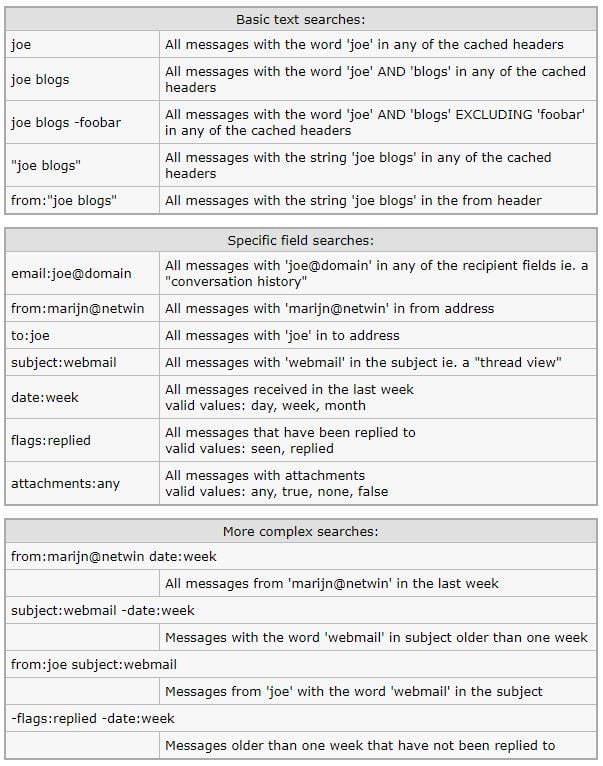
note: The “Recent” option only searches folders that have been accessed in the last month. The “All” option will search all folders but does not refresh the mesage indexes from IMAP so may not find the message you are looking for. Click any folders in question to refresh the indexes.
Body search
IMAP serverside search of the full message body and headers content. This can take a long time on large folders / or large accounts – expect approx 30 seconds per 100 MB of mail that needs to be searched through.
One or more search terms can be specified which will be ANDed together.
Note: This may take a long time
| Body search syntax: | |
| joe | All messages with the word ‘joe’ anywhere in the message |
| joe blogs | All messages with the word ‘joe’ AND ‘blogs’ anywhere in the message |
| “joe blogs” | All messages with the string ‘joe blogs’ anywhere in the message |
Imageway WebMail uses the surgemail user.cgi Friends and spam handling features. Manually correcting false positives and training messages as spam can be done using the following actions in Imageway WebMail or in an IMAP client:
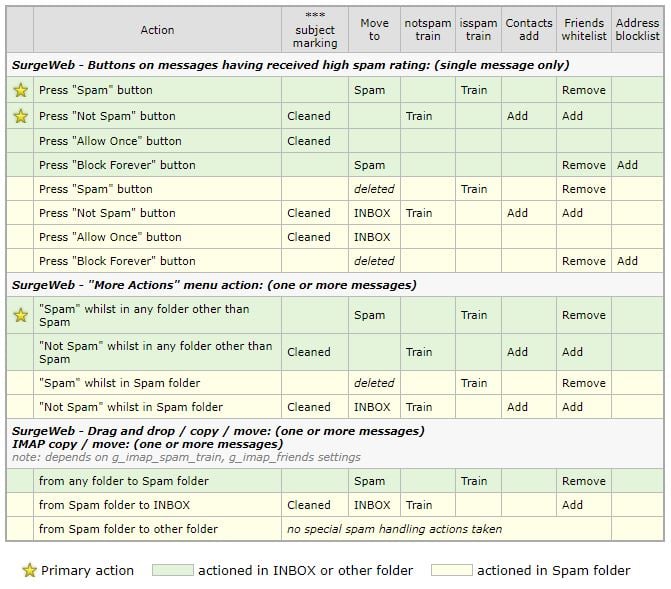
| Primary action | actioned in INBOX or other folder | actioned in Spam folder |
(No Ratings Yet)Loading...
In Windows XP and later, the Windows file redirector has a built-in WebDAV client which can be used to mount a Windows drive letter to a WebDAV Server, such as what is provided with our on-line Mobile Office service. When you copy files to this drive mapping, they are stored on the WebDAV server, which can be accessed from any computer via a drive mapping or via our Mobile Office web interface. When trying to copy large files you might run into a error that says “Error 0x800700DF: The file size exceeds the limit allowed and cannot be saved”. Windows has a built in limit on the size of a file that is allowed to be copied using WebDAV. To change this limit you must edit a registry subkey which holds the value limit, and reboot your computer. To change this registry setting do the following:
1) Click Start, click Run, type regedit in the Open box, and then click “Ok”.
2) Locate “HKEY_LOCAL_MACHINE\SYSTEM\CurrentControlSet\
Services\WebClient\Parameters” from the drop-down structure in left pane.
3) Right click on the “FileSizeLimitInBytes” subkey listed in the right pane, then click “Modify”.
4) Click the “Decimal” bubble under the “Base” section.
4) In the “Value data” box, type 4294967295, and then click “Ok”.
6) Reboot your computer.
Completing the above increases the WebDAV file limit in Windows you can copy via WebDAV to 4 gig for a single file.
Please note: Unfortunately, the built-in WebDAV client (WebClient service) in Windows 10 was officially deprecated as of November 2023 (https://learn.microsoft.com/en-us/windows/whats-new/deprecated-features). While it has not been completely removed yet, it is no longer under active development and is not started by default. You will have to start the “WebClient” service manually in any versions of Windows past November 2023 to get WebDAV to work. Microsoft has marked it for removal in a future version of Windows.
(25 votes, average: 4.24 out of 5)Loading...All rights reserved. Copyright © 2000-2025 Imageway, LLC.
